
Platform, integration and deployment.
Factual answers for engineering, operations, quality and IT teams evaluating Arkite: what the platform does, how a workstation is built, how it connects to MES and ERP, and how it scales from one station to a plant.
Last updated
Platform and tiers
What is Arkite?
Arkite is a manufacturing execution platform for manual operations. It turns manual assembly, kitting and inspection work into digitally structured workflows that are validated in real time and generate measurable production data. Arkite completes the digital manufacturing stack: the ERP decides what to build, the MES decides when to build, and Arkite tells operators how to build, step by step, validated and traceable. Arkite NV is headquartered in Genk, Belgium, with a second office in Aachen, Germany.
Is Arkite a hardware product or a software platform?
Arkite is a software platform. It is built around a central server, distributed workstation clients, a no-code workflow engine and open integrations with MES, ERP, PLC systems and smart tools. Projectors and sensors are enablers of the software, not the product itself. The same software core runs on every workstation, from a single pilot station to a multi-plant deployment, and all projects, users and production data are managed centrally on the Arkite server.
What is the difference between Arkite GUIDE, VALIDATE and VISION?
They are three levels of operational maturity on one software core, and each level includes everything in the level below. GUIDE provides digital work instructions with AR projection on the workbench; the operator confirms each step by touch screen, virtual button, hardware button or foot pedal. VALIDATE adds real-time 3D operator validation: the Arkite 3D sensor verifies every pick and assembly action and its sequence. VISION adds in-process product inspection with a high-definition Arkite Vision sensor that checks small parts, orientation and position during assembly.
Can different workstations run on different tiers?
Yes. Mixed-license environments are fully supported. Different workstations connected to the same Arkite server can run GUIDE, VALIDATE or VISION depending on the validation each task requires. A kitting station may run VALIDATE while a final assembly station with small, critical components runs VISION. Several license keys of different tiers can be combined on one server, and all workstations share the same projects, users and data infrastructure.
How is Arkite different from standard digital work instruction software?
Most digital work instruction tools display information but do not validate execution. Arkite projects instructions directly on the physical workbench, validates each step in real time with a 3D sensor (VALIDATE), inspects product quality at component level during assembly (VISION) and records structured data for every action: cycle times, step durations, errors and torque values. It also integrates bidirectionally with MES, ERP, PLC systems and smart tools. The result is a documented, validated and data-generating production process.
Does creating work instructions require coding skills?
No. Arkite is built on a no-code workflow engine. Process engineers define jobs, such as an assembly, a kitting task or an inspection, then teach the detections for picking bins, parts, tools and virtual buttons. Projections and text instructions are generated automatically from those detections. Engineers then structure the job in numbered steps and sub-assemblies, add text, images, video and icons, and add logic where needed: conditions, loops, variants and communication with external systems.
How does Arkite handle product variants?
Variants are managed through jobs, job options and job variants. Job options are properties for which the steps differ, such as color, size or optional parts, and their combinations form the job variants. Shared steps are defined once, and variant-specific steps run only when they apply. The correct variant is selected on the operator screen, by scanning a barcode or automatically from the MES. Variants can be imported from and exported to CSV files, and there is no practical limit on the number of variants in a project.
What is the Experience Level feature?
Experience Levels adapt guidance to the proficiency of each operator. Three levels are available by default, Training, Basic and Advanced, and they can be renamed. Per level, engineers define which visualizations appear (for example extra text, images or video for new operators only), how projections behave, such as blinking during training, and how fast detections react on VALIDATE and VISION workstations, so experienced operators are not slowed down. The level is assigned per operator or selected at the workstation.
Is multi-language support available?
Yes. Instructions, button labels and all other text elements can be defined in as many languages as required. Instructions appear in the language of the logged-in user, and operators can switch language at the workstation at any time through the menu bar. Detection names can also be defined per language, so automatically generated instructions appear in the correct language. With the optional AI integration, texts can be translated automatically from the default language, per field or for an entire project.
Workstation and hardware
What does a typical Arkite workstation consist of?
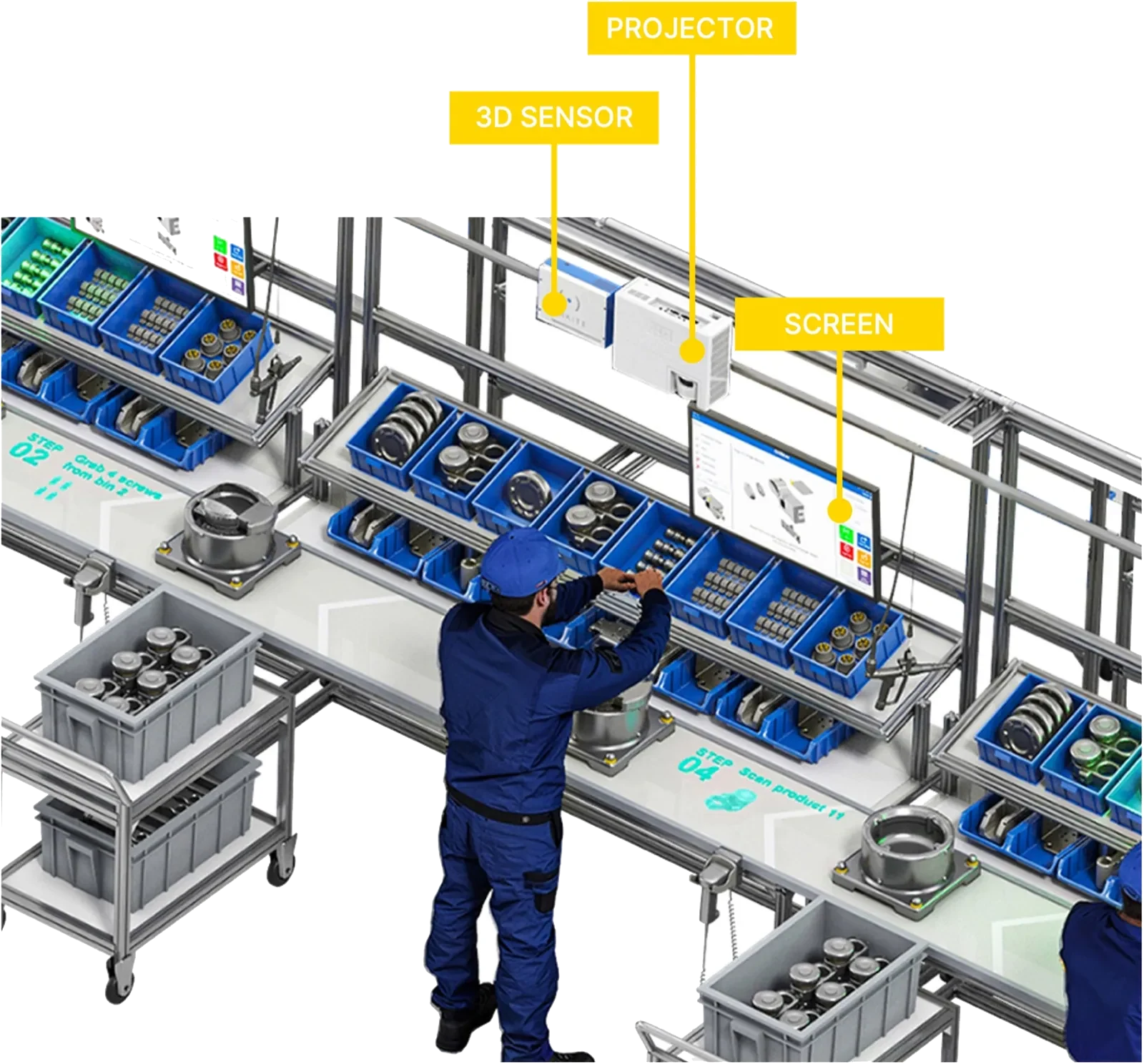
A typical workstation combines a PC running the Arkite client software, one or more projectors that project instructions on the workbench, and an operator display, usually a touch screen. VALIDATE and VISION workstations add the Arkite 3D sensor, mounted next to the projector and pointing down at the work area. VISION adds the Arkite Vision sensor above the product. Optional peripherals include the Arkite RGB sensor, smart tools, barcode scanners, foot pedals, label printers and pick-to-light. A workstation supports up to three sensors.
How does the Arkite 3D sensor work?
The Arkite 3D sensor is a Time-of-Flight sensor. It emits infrared light, invisible to the human eye, and measures per pixel how long the light takes to reach an object and return. The software places virtual detection boxes on the resulting 3D image of the work area. Operator activity or the presence of an object in a box triggers a detection, and combining detections in sequence validates the procedure. A second infrared intensity stream supports edge detection, mainly for tools.
How does Arkite VISION inspect the product during assembly?
With a VISION license, the workstation uses an additional high-definition infrared Arkite Vision sensor. Before the next step starts, the software checks the presence of small components such as washers, clips and screws, the orientation of parts, including symmetric parts such as gears, and their position within a configurable tolerance. It also supports quality checks with multiple result classes, each with its own rework path, and non-rigid shapes such as bent cables or glue dots.
Does Arkite read barcodes, QR codes and text?
Yes, on all license tiers. Barcode and QR code scanners connect over USB, for example to scan a serial number, an order or an operator badge. Since software version 2026.1, camera-based detections also read and optionally validate barcodes, QR codes, Data Matrix codes and text through OCR directly from the image, and the workflow can follow a different path depending on the result. Camera-based reading requires an Arkite RGB sensor on GUIDE and VALIDATE workstations.
What if a part is within range of the sensor but not visible?
Because the 3D sensor is mounted in one fixed position, some objects are hidden from view. Stacked picking bins are the most common example. The software handles this by placing small detection boxes at the entrance of each bin, so the sensor detects the operator's hand entering the correct bin even when the bin itself is occluded. For mobile picking racks, detection groups can be switched on and off. Low-contrast objects can be detected reliably with reflective tape.
Do lighting and other environmental conditions affect the system?
The Arkite 3D sensor uses its own infrared light source, which makes it robust under normal factory lighting. The point of attention is external infrared sources, such as direct sunlight or certain heating lamps. Color-based checks with the RGB sensor depend more on lighting, so a controlled light source is advised. All objects in the process should have a fixed position on the workbench: the system checks presence and absence at taught locations and does not track freely moving objects.
How is the hardware mounted?
The Arkite 3D sensor and projectors are mounted side by side above the workbench, pointing down. Mounting height is typically 2 m and can vary between 1 and 4 m; the higher the sensor, the larger its field of view. The projection area is smaller than the sensor's field of view, and a second projector can extend it. The Arkite Vision sensor is mounted 0.5 to 2 m above the product. Arkite advises on the optimal position based on the workstation layout.
Can we use our own workstation PC?
Yes. Workstations can run on a PC delivered by Arkite or on your own hardware, provided it meets the minimum requirements for the license tier. GUIDE needs an Intel Core i3 and 8 GB RAM, VALIDATE an Intel Core i5 and 16 GB dual channel RAM, and VISION an Intel Core i7 and 16 GB dual channel RAM. With an Arkite RGB sensor, GUIDE and VALIDATE also need an i7. Every workstation needs at least a 64 GB SSD and runs Windows 10 or later, excluding the Windows 10 Enterprise LTSB and LTSC editions.
Does Arkite support pick-to-light for picking and kitting?
Yes. In logistics and kitting, operators are guided by AR projection or by DMX pick-to-light, while the 3D sensor validates each pick. Pick-to-light is effective for large bins or extended picking areas that projection alone cannot cover. DMX lights connect through Art-Net or an Enttec Open DMX USB interface, and each detection can be linked to a specific light. The number of items to pick is shown in the instruction and logged.
Integration and IT
Which systems does Arkite integrate with?
Arkite integrates into the existing manufacturing ecosystem. It does not replace the MES or ERP; it connects them to the operator layer. Typical integrations are the MES for job orders, product variants and operator assignments, the ERP for scheduling and traceability data, the WMS for picking bin content, smart tools for torque control and feedback, PLC systems such as Siemens S7, BI platforms such as Power BI, and Active Directory for user authentication.
Which communication protocols are supported?
Communication modules are configured without programming. Supported protocols and devices include OPC UA, MQTT, Modbus TCP, Siemens S7, Open Protocol for smart tools, TCP/IP client and server, and HTTP web services. Database connections cover MySQL, MS SQL Server, Oracle, MariaDB and SQLite. Arkite also supports USB barcode and QR scanners, NFC readers and foot pedals, COM serial ports, pick-to-light, DMX lighting, Epson label printers, inter-workstation communication and PJLink projector control.
How does the MES integration work in practice?
Jobs are created in the MES and pushed to the Arkite server through the API. Process engineers adapt the instructions in Arkite so they are practical for the physical workstation, and once approved, jobs are deployed to the correct workstations. When an operator logs in by badge scan or manual selection, the workstation retrieves the correct job and product variant from the MES automatically. This removes manual job and variant selection from the operator's tasks.
Does Arkite have an API?
Yes. The Arkite API is a REST API for retrieving and modifying project data and for running operations on active workstations. Examples include scheduling tasks on a workstation when an order is received, loading a project on a specific workstation at the start of a shift, updating picking bin content from a WMS and reading the status of a detection. Full API documentation is published on SwaggerHub, an API tester is available in the software, and every user has a personal API key.
Can Arkite be integrated with smart tightening tools?
Yes. Smart tools connect through Open Protocol, Ethernet or Modbus. Arkite can enable the tool only during the correct step and, on VALIDATE and VISION workstations, only at the correct location on the workbench. It selects the required program or torque automatically, blocks the next step until the specified torque is confirmed and logs torque values per assembled unit. Small fasteners are validated by combining the pick from the correct bin, the tool position and the torque result.
What server and network infrastructure does Arkite require?
Arkite uses a server-client architecture. The client software runs on each workstation, and the server stores all projects, users, resources and production records. The server is preferably installed on a separate physical server, virtual machine or VM in your private cloud. Minimum requirements are Windows Server 2012 or higher, or Windows 10 Enterprise LTSC 2019 or higher, 8 GB RAM up to 10 workstations and 16 GB above 10, and 100 GB SSD after OS installation plus 20 GB per connected workstation. Workstations connect over a reliable wired network, and the server's REST API on port 443 must be reachable by the workstations and by MES and ERP applications. The server backs up its databases every hour when changes are made; the frequency is configurable.
Deployment and support
How long does it take to deploy Arkite?
A pilot workstation can typically be operational within a few days of installation, and engineers need approximately two days of training to create and publish work instructions independently. Production-line rollouts are scoped on the number of workstations, the complexity of product variants and the depth of MES and ERP integration. Arkite's implementation team and certified partners support each stage, from installation and sensor calibration to engineer training.
Can we start with one workstation and expand later?
Yes. Arkite is designed for incremental scale: pilot workstation, production line, multi-line rollout, entire plant and multi-plant standardization. Because configuration is managed centrally on the Arkite server, new workstations connect to the existing server and existing projects are immediately available. Projects do not need to be rebuilt, and the same project can be deployed on multiple identical workstations.
How should we prepare a project?
Design for scalability from the start: when workstations, tooling and processes are standardized, a project built for one station rolls out to identical stations with little effort. Many manufacturers combine the introduction of Arkite with a Kaizen event. Useful questions include: which problem must be solved, what area must the sensor and projector cover, how much free height is available, can containers and tools take fixed positions, can the product be held in a fixture, and which integrations are required.
Can engineers prepare projects without stopping production?
Yes. Any PC connected to the Arkite server can be used as an editor, for example a laptop at the engineer's desk. Editors prepare and configure projects for any workstation on the server and can run them for up to 15 minutes for testing. Sensor recordings allow detections to be prepared away from the line. Several authors can work on projects stored on the server, and updates are published centrally.
How do version control and approval work?
Every project has a version and a status: Draft, Review or Production. Each change creates a new minor version, and releasing to Production creates a new major version. A full version history is kept, and any previous version can be reviewed and restored. For regulated production, an approval workflow can be enabled so that only users with the Approver role can release a project to Production. Operators have read-only access to projects in Production status.
How are software updates delivered?
Arkite releases new software versions regularly, named by year, for example 2025.1, 2026.1 and 2026.2. Release notes are available in the software and on the customer portal, and each release is presented in a technical webinar. Updates are installed on the server. Workstations detect that their version differs from the server and offer to download and install the new version. A backup is created automatically before each server upgrade.
What implementation and ongoing support does Arkite provide?
Arkite and its certified partners provide structured onboarding: installation, workstation configuration, sensor calibration and engineer training. Ongoing support is available through the Arkite support portal and support@arkite.com, remote support via TeamViewer, the customer portal with documentation, procedures and release notes, and the software manual with context help inside the software. Customers decide when remote access is granted.
How can our team build the knowledge to manage Arkite independently?
The software is designed so that process engineers can build and maintain projects independently after approximately two days of training. Arkite Academy, the online training platform for customers and partners, adds short hands-on modules on setup and installation, software essentials and connectivity with external devices and protocols. Arkite Academy is available in English and French through the customer portal, and its content is expanded with each release.
Is Arkite suitable for multi-plant deployments?
Yes. The central server architecture supports standardization across lines and sites. The same work instructions, validation logic and quality standards can be deployed and maintained from a central location. Projects can be exported from one server and imported on another, so a validated process can be transferred to other plants. This supports consistent execution regardless of location or operator base.
Data and security
What production data does Arkite capture?
Every workstation feeds structured data back to the Arkite server: cycle times against expected cycle times per job and variant, step durations, errors with time and workstation, torque values from integrated smart tools, number of items picked per step, the operator and experience level used, and traceability records per serialized unit. Log data is stored in the Arkite logging database or in your own MySQL, MS SQL Server, Oracle or MariaDB database, with configurable retention.
Which dashboards are included, and can we use Power BI?
The software includes four real-time dashboards: workstation status, job output per hour, day or week, cycle times per job, variant and workstation with trend line, and live step duration compared with the average. All production data can also be used in Power BI or another BI platform through a direct database connection, CSV export or the Arkite API. Manufacturers use this to identify bottlenecks, optimize cycle and takt times, and reduce scrap and rework.
How does Arkite support production traceability?
Arkite records every operator action, validated step and deviation against a production order and serial number. In case of a quality issue, you can retrieve a complete log of every step performed on a specific unit, including the operator, the time, the result of each validation and the torque values applied. Product snapshots can be stored with the unit record, for example as an image in a database.
Is Arkite suitable for regulated production environments?
Arkite is used in aerospace, defense, automotive, medical device and general manufacturing, and several capabilities support compliance. Version management includes an optional approval workflow. Traceability is recorded per unit for steps, validations and torque values. Audit logging records every change to projects and settings with user, timestamp and previous and new values, in append-only records protected by a hash chain. Access is role-based, with Active Directory authentication.
Where is our data stored, and who owns it?
All project and production data is stored on your own Arkite server, on-premises or in your private cloud, and remains fully owned by you. Log data can also be written to your own database. Workstations do not depend on an external cloud service during operation. Optional AI features used during engineering send text to the AI provider you select, only when enabled and configured with your own key.
How does Arkite handle GDPR and operator privacy?
Operator identification is optional. Workstations can run with a generic login, or operators can log in by badge or user account when individual traceability is required. Viewing, recording and taking snapshots of sensor streams is restricted to users with a dedicated role, and images are stored only when this is explicitly configured, for example product snapshots or recordings for engineering and support. Arkite NV processes personal data in line with the GDPR.
How are users and access rights managed?
Users and roles are managed centrally on the server, so a user can log in on every connected workstation. Users can be local Arkite users or Active Directory users, with access granted per Active Directory group. Default roles include System Admin, User Manager, Editor, Approver, View Sensor Streams, View Dashboarding Tab and View Log Tables, and custom roles can be added. Operators have read-only access to projects in Production status.
Commercial and partners
How is Arkite licensed?
Arkite is licensed per workstation in three tiers: GUIDE, VALIDATE and VISION. A server license key covers a defined number of workstations, and keys of different tiers can be combined on one server. Recurring licenses can be used with any software version. Perpetual licenses are linked to a specific software version, with a service contract for upgrades and support. Workstations without an assigned license act as editors for engineering work.
How much does Arkite cost?
Pricing depends on the number of workstations, the license tier per workstation, the license model, the hardware configuration and the integration scope. Arkite does not publish a standard price on its website because most deployments combine different tiers and integrations. Contact Arkite or a certified partner for a configuration aligned with your production environment. A pilot workstation is the usual first step before a wider rollout.
How is Arkite sold and implemented?
Arkite is sold and implemented together with a network of certified partners across Europe. Partners handle local sales, installation, workstation configuration and first-line support, backed by the Arkite product and support teams. Partners are trained through Arkite Academy and work with Arkite on use cases, lead follow-up and events through the Arkite partner portal. Contact Arkite to be connected with the partner for your region.
What is the relationship between Arkite and Bosch Rexroth?
Bosch Rexroth delivers the physical workstation: ergonomic workstation framing, smart tooling, Kassow collaborative robots and its Certified Excellence Partner deployment network. Arkite delivers the operator guidance platform on top of it: AR projection, 3D sensor validation, vision inspection, MES and ERP integration and production data. Arkite is the digital execution layer on the Bosch Rexroth workstation; the two are separate offerings that are designed to work together.
What improvements can manufacturers expect?
Manufacturers use Arkite to reduce assembly errors through real-time validation, cut scrap and rework by detecting issues during assembly rather than after it, shorten operator onboarding with structured visual guidance, standardize processes so every operator follows the same validated procedure, control variant complexity and retain expert knowledge in digital workflows. The size of each effect depends on the starting situation, which is why a business case is built on your own data.
How do we build a business case?
The business case is built on your own production data. Typical inputs are current error, scrap and rework rates and the cost per defect, labor cost and cycle times, the number of new operators trained per year and their time to full competency, the number of product variants and frequency of changes, and the cost of quality escapes and customer complaints. A pilot workstation is the most reliable way to validate these assumptions in your own environment.
How do we get started with Arkite?
The recommended first step is a product demonstration with the Arkite team. You see the platform in the context of your own production process, and together you define the scope of a pilot workstation: the problem to solve, the license tier, the hardware layout and the integrations required. From there, the pilot validates the business case before a line or plant rollout. Demonstrations can be booked through the Arkite website.
AI
Can AI help to create work instructions?
Yes. Since software version 2026.2, engineers can generate jobs with AI. Based on a written description of the assembly, the software generates the job, job options, materials, detections and job steps. The engineer then reviews and finalizes the result before it is released to production. Detections are taught on the sensor image of the workstation, as with any other job.
Can AI translate work instructions?
Yes. With the optional AI integration, all instructions and text elements of a project are translated automatically from the default language: per field, for all empty fields or for the entire project at once. Instructions are shown in the language of the logged-in user, and operators can switch language at the workstation at any moment.
What are AI detections in Arkite VISION?
Since software version 2026.2, Arkite VISION includes an AI detection mode next to the existing detection modes. Teaching works as before, with one reference image and one expected result. AI detections are more tolerant when a part shifts or rotates slightly and transfer more reliably from one workstation to another after fine-tuning calibration, which simplifies rollout. They run locally on the workstation, are included in the VISION license and need no internet connection. Parts still need a defined position on the workbench.
Which AI providers are used, and what data is sent?
AI job generation and translation use an integration with OpenAI or Anthropic, configured with the customer's own key. These integrations are optional, disabled by default and require an internet connection. Text is only sent to the selected provider when the integration is enabled, and it is processed under the customer's own agreement with that provider, which also determines whether data may be used for model training. Project and production data stay on your own Arkite server.
Do workstations need an internet connection for AI?
No. The AI detection algorithms of Arkite VISION run locally on the workstation and need no internet connection. Only the optional AI job generation and translation require an internet connection, and only when they are enabled.
Which license includes AI?
The AI detection algorithms are included in the Arkite VISION license. AI job generation and translation are optional integrations in the Arkite software, configured with your own OpenAI or Anthropic key. See the Arkite AI page for an overview.
Related
Arkite AI
AI job generation, AI translation and VISION AI detections, with data under your control.
GUIDE, VALIDATE, VISION
Three levels of operational control on one software core.
Integrations
MES, ERP, PLC, smart tools, databases and BI.
Enterprise deployment
From pilot workstation to multi-plant standard.
Technical overview
Downloadable platform documentation and e-books.
Question not answered here?
See the platform on a process that resembles yours, or send your question to the Arkite team.