
Enterprise deployment

One workstation to global standard.

Arkite is designed for incremental scale. All configuration lives on a central server, so every new workstation, line or plant builds on what is already validated.

Last updated

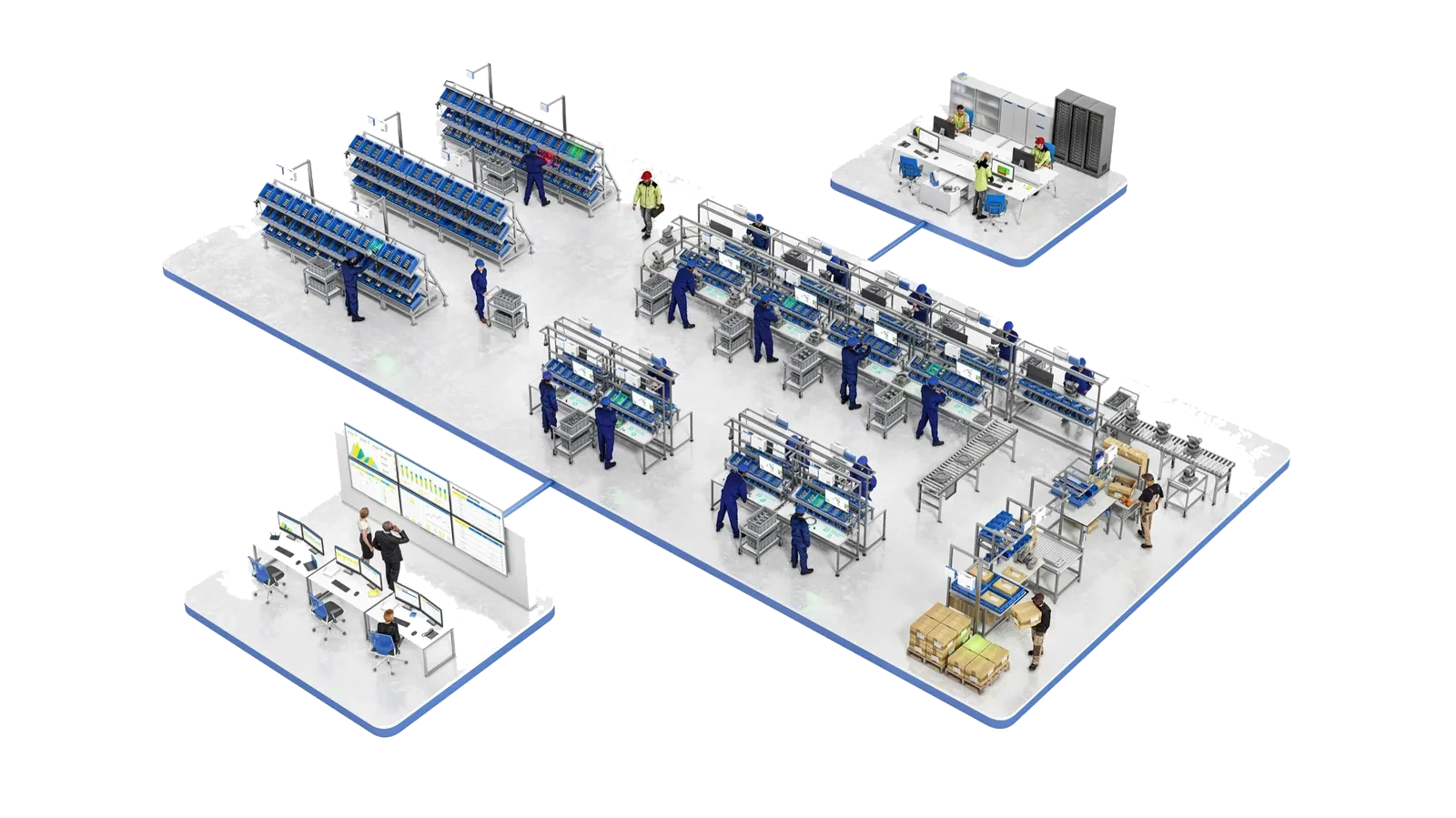
Plant-wide Arkite deployment across picking, assembly and packaging, connected to engineering and a control room
Deployment path

Scale in stages, without rebuilding.

  1. 01

    Pilot workstation

    Validate the process, the integrations and the business case on your own product, in your own environment. A pilot workstation can typically be operational within a few days of installation.

  2. 02

    Production line

    Extend to the stations of one line. A project built for one station can be deployed on identical stations.

  3. 03

    Multi-line rollout

    New workstations connect to the existing server, and existing projects are immediately available.

  4. 04

    Entire plant

    Picking, assembly, packaging and inspection run on one platform, one server and one data model.

  5. 05

    Multi-plant standardization

    Projects are exported from one server and imported on another, so a validated process transfers to other sites.

Architecture

Central server, distributed clients.

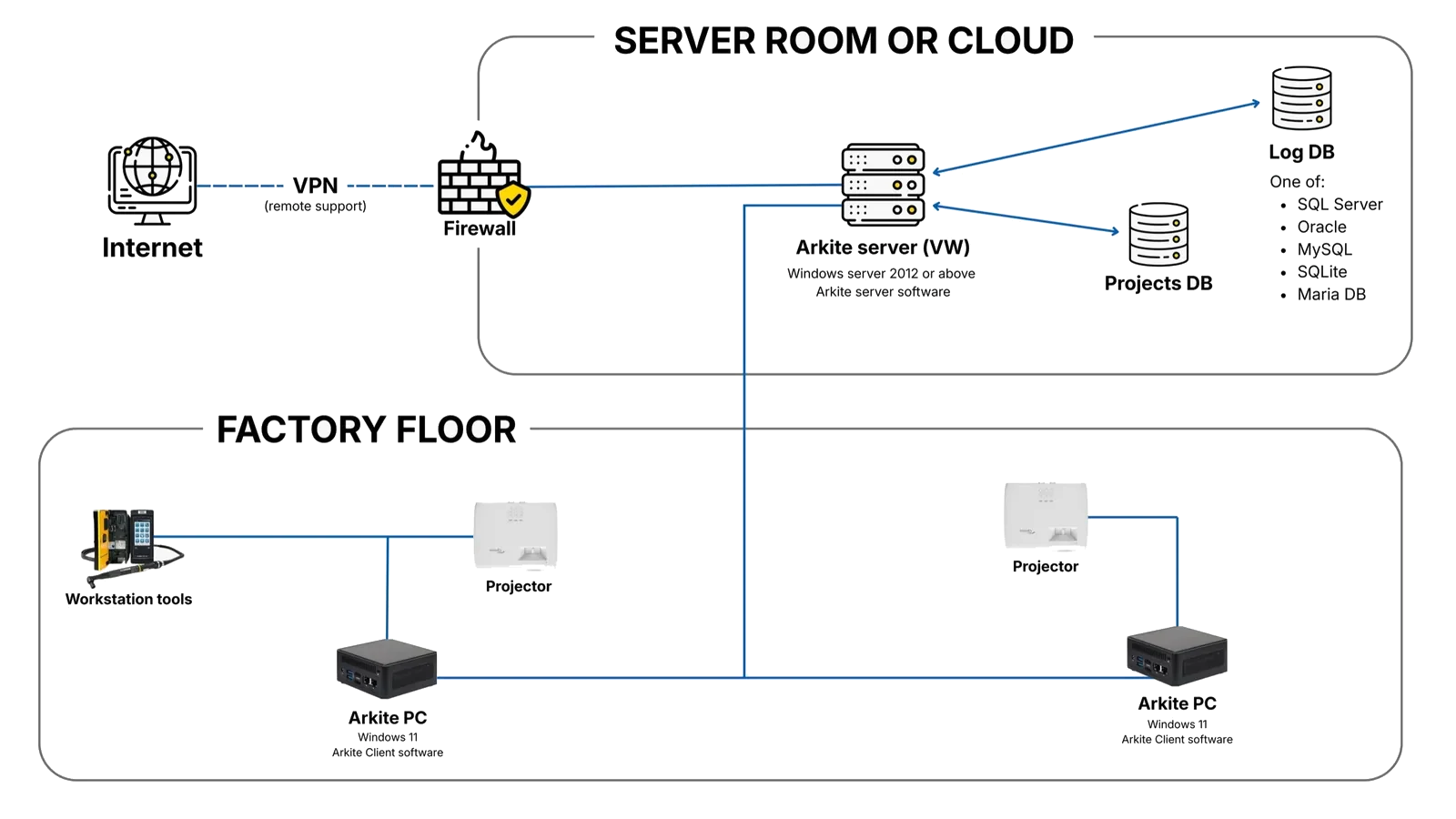
The Arkite client software runs on each workstation. The server stores all projects, users, resources and production records, and is preferably installed on a separate system: a physical server, a virtual machine or a VM in your private cloud.

This structure keeps installation and upgrades manageable, protects data integrity, allows several authors to work on shared projects and makes it simple to replace a workstation.

  • Server on Windows Server 2012 or higher, or Windows 10 Enterprise LTSC 2019 or higher
  • 8 GB RAM up to 10 workstations, 16 GB above 10
  • 100 GB SSD after OS installation, plus 20 GB per connected workstation
  • Workstations connect to the server over a wired network
  • REST API on port 443 for workstations, MES and ERP
  • Automatic hourly database backups when changes are made, frequency configurable
Arkite network architecture: server, projects database and log database in the server room or cloud, firewall and VPN for remote support, and workstation PCs on the factory floor
Governance and security

Built for IT, quality and compliance teams.

01

Users and roles

Users and roles are managed centrally, so a user can log in on every connected workstation. Default roles include System Admin, User Manager, Editor, Approver and roles for sensor streams, dashboards and log tables. Custom roles can be added.
02

Active Directory

Users can be local Arkite users or Active Directory users, with access granted per Active Directory group.

03

Version control and approval

Every project has a Draft, Review or Production status and a full version history. An optional approval workflow allows only Approvers to release to Production.

04

Audit logging

Every change to projects and settings is recorded with user, timestamp and previous and new values. Records are append-only and protected by a hash chain.

05

Data ownership

Project and production data is stored on your own Arkite server, on-premises or in your private cloud. Operator identification is optional.

06

Controlled AI use

AI job generation and translation are optional, disabled by default and use your own key. AI detections in VISION run locally without an internet connection.

Lifecycle management

Maintained centrally, updated in one place.

Arkite releases new software versions regularly, named by year, such as 2026.1 and 2026.2. Updates are installed on the server; workstations detect the version difference and offer to install the new version. A backup is created automatically before each server upgrade.

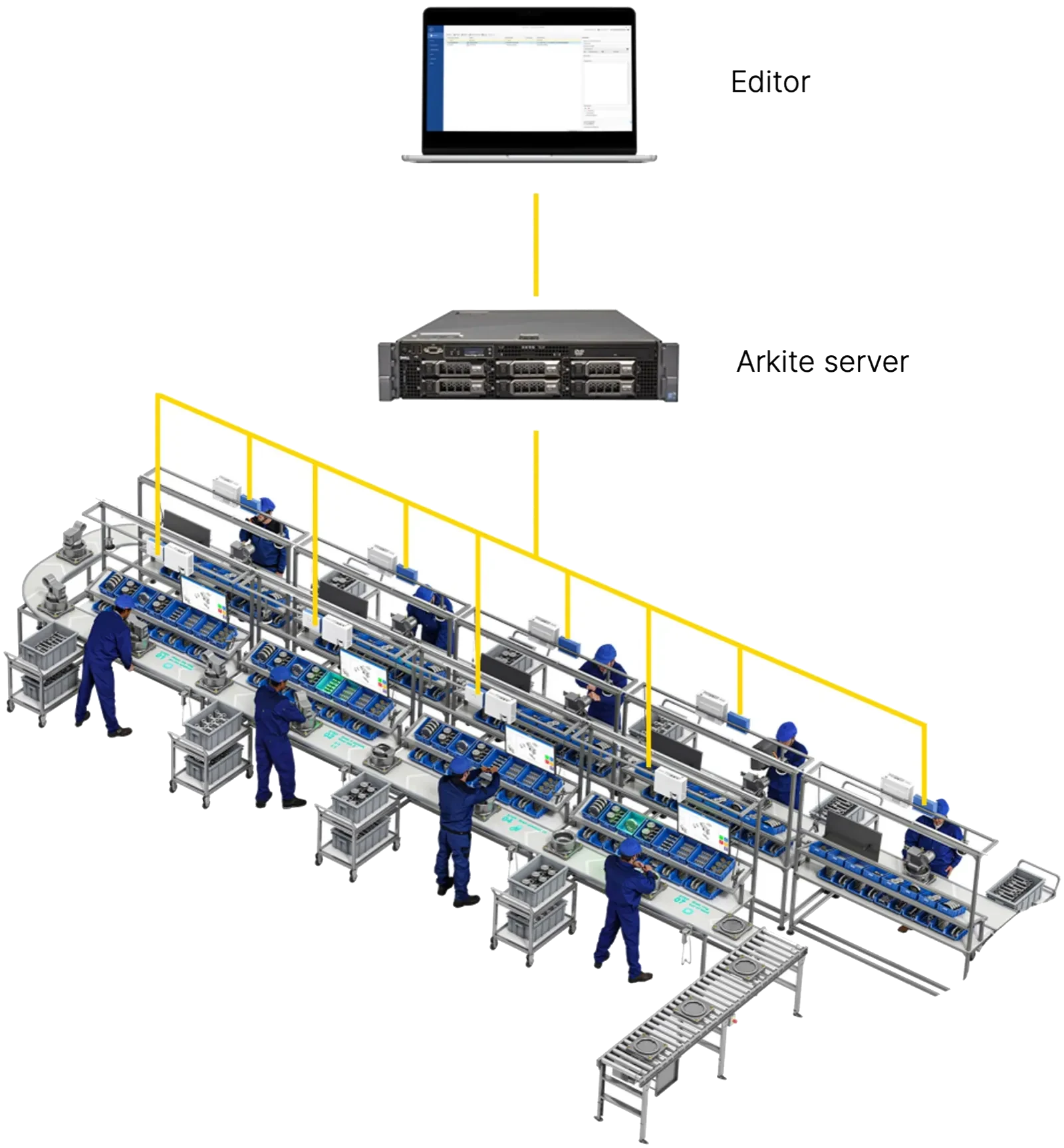
Engineers prepare and test projects on any editor PC connected to the server, without stopping production, and publish changes centrally to all relevant workstations.

Editor and Arkite server connected to all workstations on a production line
Licensing

Licensed per workstation, combined per server.

Arkite is licensed per workstation in three levels: GUIDE, VALIDATE and VISION. A server license key covers a defined number of workstations, and keys of different levels can be combined on one server. Recurring licenses can be used with any software version; perpetual licenses are linked to a specific version. Plant-wide license models are available.

Project approach

A structured route from pilot to full deployment.

Arkite and its certified partners support each stage with installation, workstation configuration, sensor calibration and engineer training. Engineers need approximately two days of training to start creating and publishing work instructions independently.

  1. 01

    Set expectations

    Define business objectives, size the opportunity and agree on the scope of a proof of concept.

  2. 02

    Define the project

    Scope content and timeline, including integration in your IT architecture, and define KPIs and key success factors.

  3. 03

    Initial deployment

    Implement the pilot with customer success management.

  4. 04

    Analyze

    Review the KPIs of the initial phase together and define improvements.

  5. 05

    Full deployment

    Roll out across lines and plants based on the validated results.

Plan your rollout with Arkite.

Start with a pilot workstation scoped for a factory-wide standard.