
AI job generation
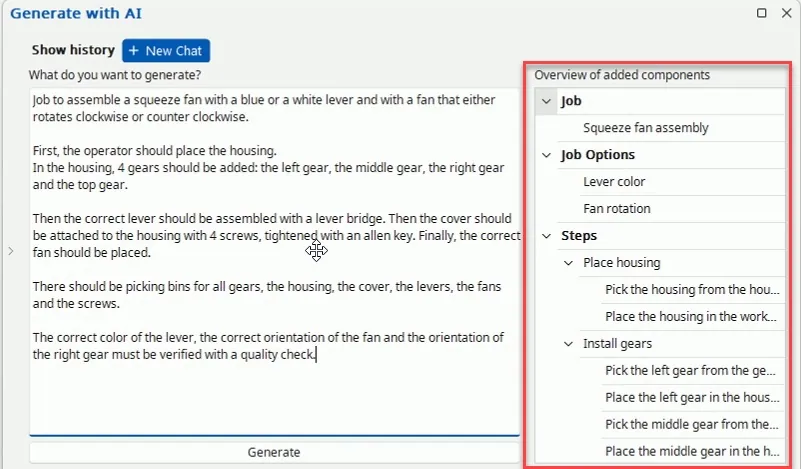
Based on a written description of the assembly, the software generates the job, job options, materials, detections and job steps. The engineer then reviews and finalizes the result.
Since software version 2026.2, AI supports the engineers who build jobs and the VISION workstations that inspect the product. Job generation and translation are optional and under your control. VISION AI detections run locally, without an internet connection.
Last updated
Arkite applies AI where it shortens engineering work and where it makes in-process inspection more robust. It does not take decisions away from the engineer or the operator: a generated job is reviewed and finalized by an engineer, and every step at the workstation is guided and validated as before.
Two capabilities support engineering: AI job generation and AI translation. One capability runs on the shop floor: the AI detection algorithms of Arkite VISION. All three are part of the same software core, the same server and the same projects.
Based on a written description of the assembly, the software generates the job, job options, materials, detections and job steps. The engineer then reviews and finalizes the result.
All instructions and text elements of a project are translated automatically from the default language: per field, for all empty fields or for the entire project at once.
AI detection algorithms give more robust results and better stability when the sensor shifts slightly. They are included in the VISION license, run locally on the workstation and need no internet connection.
AI job generation produces a structured starting point in the no-code editor. The engineer stays responsible for the job that reaches the workstation.
Write what has to be built: the parts and picking bins, the sequence of operations, the job options such as color or orientation, and the quality checks that are required.
The software generates the job, job options, materials, detections and job steps, structured in numbered steps and sub-assemblies.
The engineer reviews the result in the editor, adapts steps and instructions so they are practical for the physical workstation, and adds images, video and logic where needed.
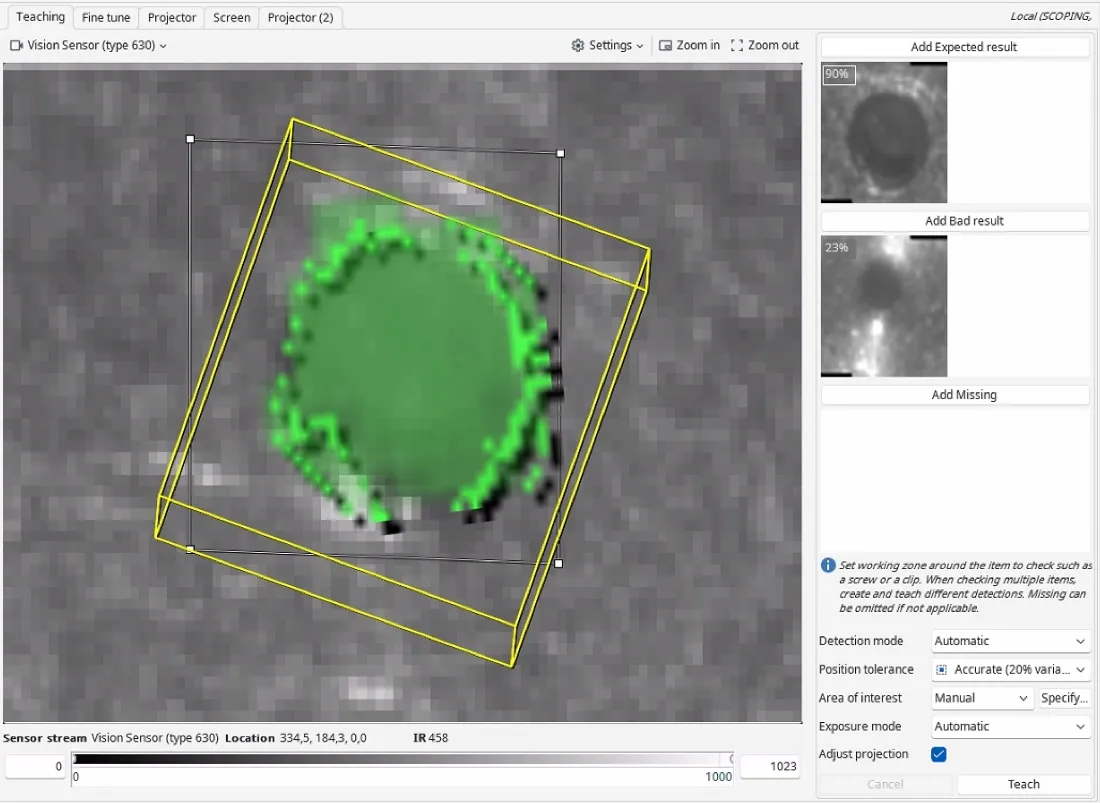
Detections are taught on the sensor image, at the workstation or from sensor recordings. Any editor connected to the server can run the project for up to 15 minutes for testing.
The project moves through Draft, Review and Production. With the optional approval workflow, only users with the Approver role can release it.
Instructions, button labels and all other text elements can be defined in as many languages as required. Operators see instructions in the language of the logged-in user and can switch language at the workstation at any moment. With the optional AI integration, translation is done from the default language in three ways.
Translate a single instruction or text element while editing a step.
Fill in every text that does not yet have a translation, for example after new steps were added.
Translate all instructions and texts of a project at once, for example when a line is rolled out to a site that works in another language.
With a VISION license, a high-definition infrared Arkite Vision sensor checks the product while it is being assembled, before the next step starts. Since software version 2026.2, VISION uses AI detection algorithms for more robust results and better stability when the sensor shifts slightly.
The algorithms are included in the VISION license and run locally on the workstation. No internet connection is required. As with all detections, the objects in the process keep a fixed position on the workbench.
All project and production data is stored on your own Arkite server, on-premises or in your private cloud. The AI capabilities differ in where they run.
| AI job generation and translation | AI detections in VISION | |
|---|---|---|
| Where it runs | Optional integration with OpenAI or Anthropic | Locally on the workstation |
| Internet connection | Required | Not required |
| Default setting | Disabled until you enable it | Part of every VISION workstation |
| Key or account | Your own key with the selected provider | No AI key needed |
| What leaves your network | Text, only sent to the selected provider when enabled | No external connection: processing stays on the workstation |
| Who uses it | Engineers, in the Arkite software | VISION workstations, during assembly |
AI job generation and translation are optional integrations in the Arkite software, configured with your own key. AI detection algorithms are included in the VISION license.
| GUIDE | VALIDATE | VISION | |
|---|---|---|---|
| AI job generation (optional integration, own key) | Optional | Optional | Optional |
| AI translation of instructions and texts (optional integration, own key) | Optional | Optional | Optional |
| AI detection algorithms for the Vision sensor, run locally | – | – |
Based on a written description of the assembly, the software generates the job, job options, materials, detections and job steps. The engineer then reviews and finalizes the result before it is released to production.
AI job generation and translation use an integration with OpenAI or Anthropic, configured with the customer's own key. These integrations are optional, disabled by default and require an internet connection.
Project and production data is stored on your own Arkite server. Optional AI integrations send text to the selected AI provider only when they are enabled with your own key. The AI detection algorithms of Arkite VISION run locally and need no internet connection.
The AI detection algorithms are included in the Arkite VISION license and run on the Vision sensor of the workstation. They give more robust results and better stability when the sensor shifts slightly.
Yes. With the optional AI integration, all instructions and texts can be translated automatically from the default language: per field, for all empty fields or for the entire project at once.
Bring a written description of one of your assemblies and we generate and review a job with you in the demonstration.
Arkite
Operator guidance platform
Welcome to Arkite.
Looking to guide, validate and inspect manual work? Choose where you would like to start.
Prefer email? info@arkite.comPrivacy
Your privacy choices
We use analytics to understand how the website is used and, with your permission, to measure the results of our campaigns on LinkedIn and Google. Measurement runs through our own server; no tracking scripts from other companies are loaded in your browser. See our privacy notice.