
Platform levels

Three levels of operational control.

One software core, one ecosystem, three validation depths. Each level includes everything in the level below, so every workstation runs the control its task requires.

Last updated

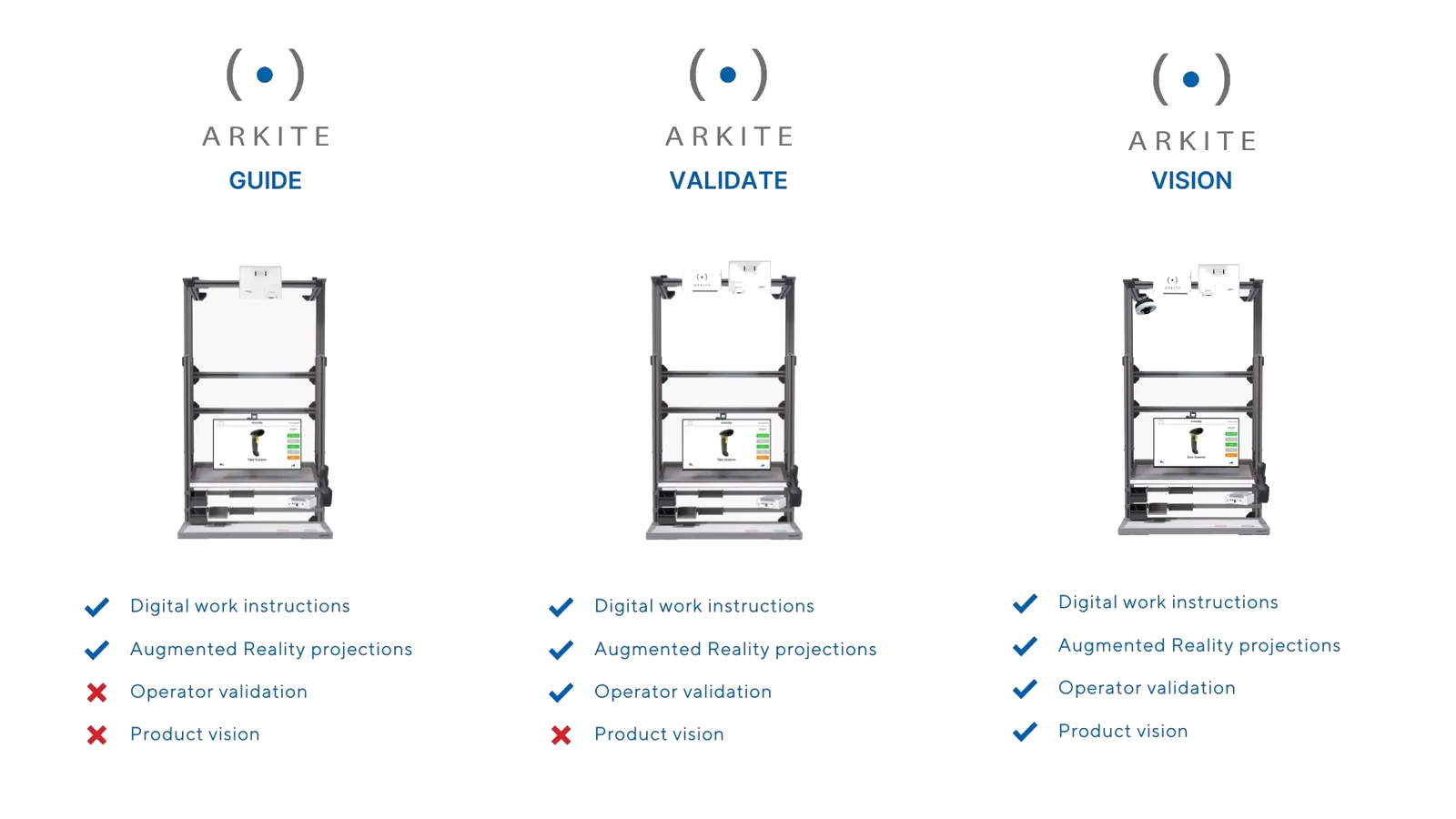
Arkite GUIDE, VALIDATE and VISION workstations side by side with the capabilities of each level
Progressive maturity

Not three products. One platform at three depths.

GUIDE, VALIDATE and VISION are not separate systems. They share the same software, the same server, the same projects and the same integrations. What changes is how much of the operator's work and the product the platform verifies.

This lets a plant start where the business case is clearest and add validation where the cost of an error justifies it, without rebuilding projects or changing the architecture.

The three levels

What each level adds.

Guidance

Arkite GUIDE

Digital work instructions with AR projection. Step-by-step instructions are projected on the workbench and shown on the operator display. The operator confirms each step with the touch screen, a virtual button, a hardware button or a foot pedal.
Operator validation

Arkite VALIDATE

GUIDE plus real-time 3D operator validation. The Arkite 3D sensor verifies that every pick and assembly action is executed correctly and in the right sequence. The workflow continues automatically after a correct action and warns the operator in case of an error.

Product inspection

Arkite VISION

VALIDATE plus in-process product inspection. A high-definition Arkite Vision sensor checks the product during assembly, before the next step starts: presence of small parts, orientation, position and quality.

Capability comparison

Capabilities per level.

GUIDEVALIDATEVISION
AR projection and on-screen work instructions
Product variants, experience levels and multi-language
Integration with MES, ERP, PLC, smart tools, scanners and databases
Barcode, QR, Data Matrix and text reading (with Arkite RGB sensor)
Production data logging and dashboards
Automatic validation of picks, placements and tool use –
Smart tool enabled only at the correct location –
In-process inspection: small parts, orientation, position, quality checks – –
AI detection algorithms for the Vision sensor, run locally – –
AI job generation and translation (optional integration, own key) Optional Optional Optional
Workstation sensors Projector and screen Adds Arkite 3D sensor Adds Arkite Vision sensor

The three levels at the workbench.

Video placeholder Three short clips of the same assembly step, shown side by side: GUIDE (operator confirms the step with a foot pedal), VALIDATE (the 3D sensor detects a pick from the wrong bin, the projection turns red, the operator corrects and the workflow continues), VISION (the Vision sensor flags a missing washer before the next step and shows the rework instruction). Demo product only.
How VALIDATE verifies

3D validation of every action.

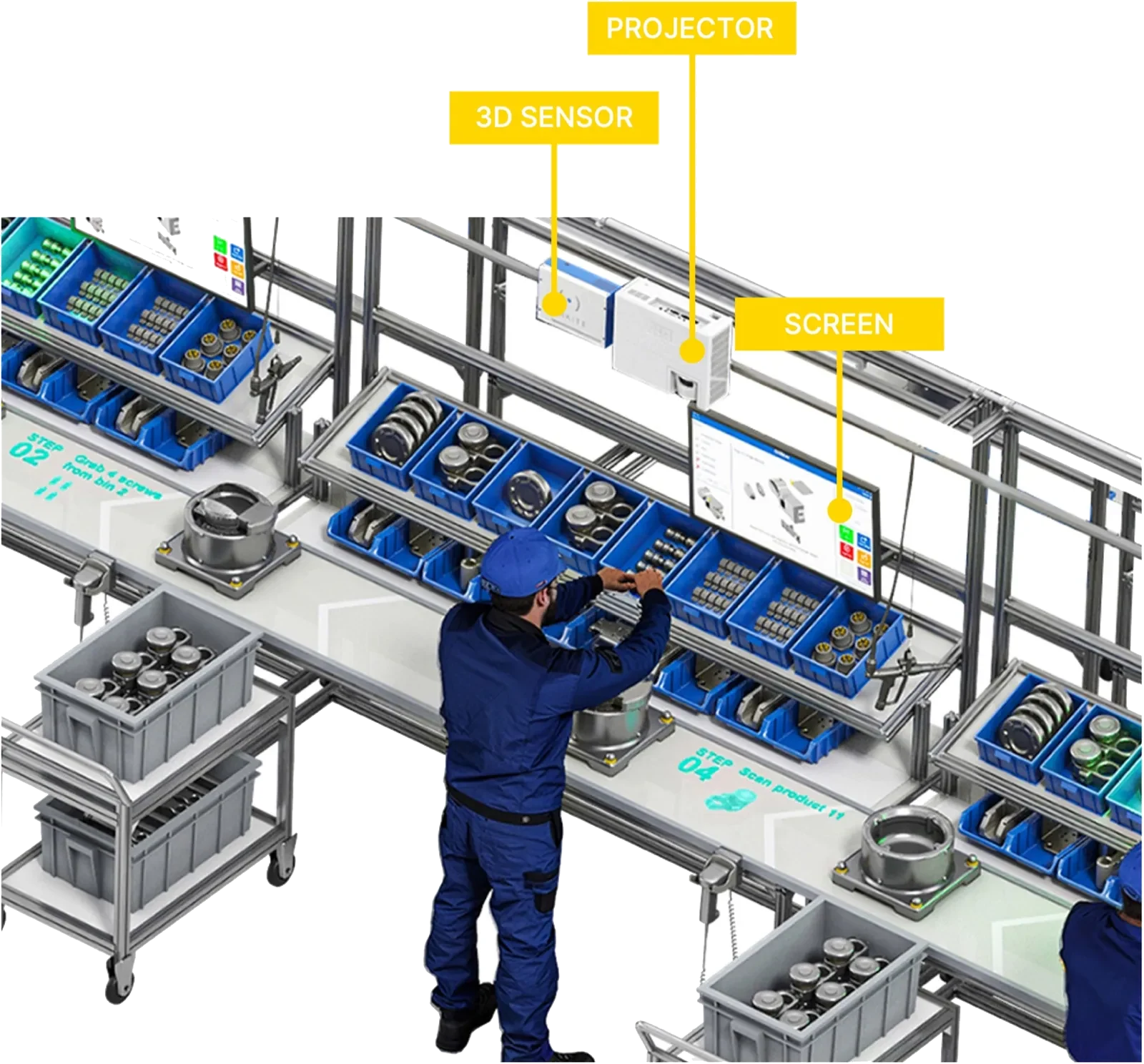
The Arkite 3D sensor is a Time-of-Flight sensor mounted above the workbench. It uses its own infrared light source, which makes it robust against normal factory lighting. Virtual detection zones are placed on the 3D image of the work area: an operator's hand entering the correct bin, a part placed in the correct position or a tool used at the correct location triggers a detection.

Combining these detections in sequence validates the procedure. Because the sensor detects objects at their taught location, parts, bins and fixtures have a fixed position on the workbench, which also supports a standardized 5S workstation.

Arkite workstation with 3D sensor and projector mounted above the workbench and an operator screen
What VISION inspects

Quality checks during assembly, not after.

Since software version 2026.2, VISION uses AI detection algorithms for more robust results. They are included in the VISION license and run locally on the workstation, without an internet connection.

  • Presence of small components from 0.5 cm, such as washers, clips and screws
  • Orientation of parts, including symmetric parts such as gears
  • Position with a configurable tolerance in X and Y
  • Quality checks with multiple result classes, each with its own rework path
  • Non-rigid shapes, such as bent cables or glue dots
  • Color-based checks with the optional Arkite RGB sensor, as an add-on to the infrared Vision sensor

Mixed-license environments are supported: each workstation in one deployment can run on the level its task requires.

Questions about the levels

Can we start with GUIDE and upgrade later?

Yes. All three levels run on the same software core and server. Upgrading a workstation adds sensors and validation; existing projects remain in use.

Can one plant combine different levels?

Yes. Arkite is licensed per workstation, and several license keys of different levels can be combined on one server.

Do the AI detections in VISION need a cloud connection?

No. The AI detection algorithms run locally on the workstation on a trained model. No internet connection is required during operation.

Are AI job generation and translation linked to a level?

They are optional integrations in the Arkite software, used by engineers and configured with your own OpenAI or Anthropic key. They are disabled by default and require an internet connection. The AI detection algorithms are included in the VISION license. See Arkite AI for details.

Find the right level for each workstation.

We assess your processes and error risks and recommend a license mix per station.